Showing posts with label Reviews. Show all posts

25 June 2012

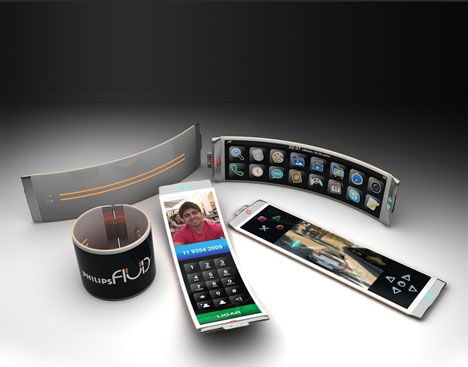
Smarthphone of the Future

The following post is about the perfect Smartphone of the Future.

The wake-up call


Time to get up. Your phone wakes you gently with a dawn chorus and light of increasing intensity. cast on to the wall by a built-in pico projector. You grab it from its wireless charging dock, present it to your yawning mug, and its facial recognition software activates the snooze function. Just 5 more minutes.

The future, today! LG WCD-800 charger, Samsung Galaxy Beam

Health check


Check out your sleep stats (how much proper REM sleep you got how much was lost to your 2am coffee habit) and your calorie-burning target for the day, which is measured by the bracelet on your wrist That tub of goose fat you ate yesterday will take some burning off, but you're going to a festival; it might just be possible.

The future, today! Zeo Sleep Manager. Jawbone UP

Morning applutions


As you wander down the hallway, you set the shower running at the perfect temperature with a tap of the screen, then stream your morning playlist from your double-based music library, A quick NFC-powered lap of the phone on to the stereo fills the bathroom with Waking on Sunshine. Also steam.

The future, today! Google Music, Android@Home

Finding the way


You hop in the car. Now where's that darn train station? Dock your phone and its projector turns part of the windscreen into a head-up display. A few spoken instructions tell it where you want to go, and it traces out a line on the road ahead. Your tunes are now streaming to the car's speakers for a mosh-tastic ride.

The future, today! Route 66 sat-nav, MVS Virtual Cable, Ford Sync

Console yourself


Uncharted: Drake's Colostomy Bag is calling following your PS4 session last night, so on the train you resume your save game in undiluted quality, powered by your mobile's octo-core Nvidia Tegra processor Touch controls still ain't much cop. so you tap it against your analogue- sticked Bluetooth pad to sync via NFC.

The future, today! Nvidia's Tegra roadmap. PS Vita, Android Beam

Expensive gestures


You've finally made it to the festival, and the burly security guard taps your phone to detect your NFC ticket before fondling your pockets You're through and at the bar purchasing a round for your males who've just tweeted you to say they're almost in All it takes is a wave at the card machine - dangerously easy.

The future, today! Google Wallet. Visa Pay Wave

Pinned down


You've found some friends, but there are still stragglers to locate. You fire up your social AR app and survey the heaving throng in front of the main stage on your screen. There's Tony near the front, marked with a pin-drop-he's just tweeted "Dubstep? So 2012. Wish they were playing something bleepier."

The future, today! Wikitude and Highlight apps, Facbook places

Zoom and share


You can't get any further forward but that wont stop you from capturing every bead of sweat the singer's brow: thanks to yo phone's 60MP image sensor you can be way back from the action and still zoom in to take a crisp snap- Your photo syncs to the cloud and posts to Facebook and the envious comments roll in.

The future, today! Nokia PureView 808

Moshly unharmed


Finally in the thick of it, you get little carried away in the mosh pit. Your phone's gone, stamped into the mud by energetic punks. After some frantic scrabbling you miraculously locate it and wipe it down - not a scratch, and the filth's done no damage either. Thanks liquid-repellent nano-coating technology!

The future, today! P2i Aridion, Gorila Glass 2

Shine a light


As the last of the daylight fades and the headliners hit the stage it's time to capture the moment. Your phones high-power 40W LED flash illuminates the situation (and helps you find the keys Tony dropped), while face recognition tech auto-tags each fizzog as it's uploaded to Facebook and add to the festivals event page.

The future, today! STCF04 LED flash from STMicroelectronics

Steam dreams


Time to leave - camping's not your bag. On the train home you catch up with Harry Potter and the Endless Dole Queue, streamed in unfettered 1080p on your phone's 5in screen, with 7.1 Dolby Digital Plus sound through your headphones. Your zippy 4G connection ensures it won't drop a frame of the middle-aged magic.

The future, today! Everything Everywhere 4G. Voddler video

Early warming


There's an unseasonal frost forming on the windows of the train, so you fire up the app that controls your home's thermostat and whack it all the way up ready for your return. You can even set different temperatures for each room. Now when you walk through the front door the it'll be toasty and warm. Lovely.

The future, today! Nest Learning Thermostat


RAID your freezer
 

You're almost home exhausted but having moshed through your caloric target for the day. A quick remote browse of your freezer shows a spare bag of chips, so before you tap your phone to your front door and enter your PIN code, you stick the oven on to preheat. Mmm. McCain Home Fries. The true food of the future.

The future, today! AT&T Digital Life, LG Smart Appliances

Show them everything


Before turning in, chip-stuffed you decide to show absent mates what they missed out on. You initiate a 3D video call using the pair of 12MP cameras on the front of your phone and live-share some of the 4K footage you've shot today. Now if that sleep management app would just stop telling you to go to bed...

The future, today! Yahoo! Messenger. LG Optimus 3D


Please share with us, what you expect from the future smartphones in the comment box below.

13 June 2012

Top 5 Features of Windows 8

Windows 8

In this post we discuss about the top 5 features found in Windows 8.

1. Fewer Surprise Restarts


Desks across the world have fist-sized holes in them, caused solely by Windows' habit of restarting to implement a security update, often losing unsaved work in the process. Windows 8 doesn't abandon forced restarts, but it's much more considerate about them.

First, Microsoft promises only to restart for the security patches that arrive on Patch Tuesday once a month - unless a "critical security update to fix a worm-like vulnerability" crops up, in which case Microsoft will push out an update that will restart machines. Second, it will ease off on the nagging: there will be no more pop-ups interrupting presentations or DVD playback. Microsoft will instead place a prominent warning about necessary restarts on the revamped lock screen. Furthermore, it will give three days' notice of any restart, as opposed to the 20-minute default countdown from Windows 7.

As well as the three-day deadline, Windows 8 won't restart i: there are applications running in the background or if there's unsaved work open. How Microsoft defines "unsaved work" is, however, unclear: would data in a web form or CMS that hasn't been submitted count as unsaved work?

2. Built-in Antivirus


Microsoft seems reluctant to shout about it - perhaps through fear of attracting unwanted anti-trust attention - but Windows 8 is the first version of Windows to include built-in antivirus protection. And not before time.

Microsoft Security Essentials (MSE), the optional free antivirus package for older versions of Windows, now appears under the Windows Defender umbrella in the Windows 8 Consumer Preview. As with the Windows 7 version of MSE it's light on features, but as an unobtrusive minder to keep an eye out for anything untoward, it should suffice. Microsoft is also vetting Metro Style apps before they appear in the Store, adding another layer of protection.

Those measures, together with Windows 8's built-in firewall, could convince many people not to bother with extra, paid-for security suites. Whether it will eventually prove a bonus for malware writers - who may only have to worry about worming past Microsoft's security software instead of an entire field of third-party security suites - remains to be seen.

3. Cross-Device Synchronisation


The Windows 8 installation screen practically forces users to set up a Windows Live account. This not only becomes the PC's primary login, but it also gives access to the Windows Store and allows settings to be synchronised across different Windows 8 devices.

The lock screen, Windows desktop wallpaper and Metro theme are all synchronised by default, providing visual consistency across all of your PCs, laptops and tablets. Internet Explorer history and bookmarks are also shared, as well as other Windows settings. The Sync menu also allows the synchronisation of "certain settings in your apps", although frustratingly, it doesn't reveal any further details. On our test PCs, we saw our social network setting synchronised in the People app, but not much else.

Indeed, it could be argued that Windows 8's synchronisation doesn't go far enough. It would be nice if Microsoft at least offered to synchronise the Metro desktop and any installed apps, provided that both devices had sufficient storage space. Fingers crossed it will be sorted by final release time.

The Windows Store does at least contain a list of apps you've previously purchased, making it easier to re-download them onto a new device.

4. Improved 3G Support


Windows 8 offers native support for 3G and 4G (the latter of which won't be of use until we get the next-gen networks found in the US). Given that most high-end tablets have 3G slots in the back, Microsoft could do little else. However, this isn't the only concession that it's making to mobile broadband users.

There's built-in metering to make sure consumers and business users don't stray beyond their data cap. Hefty device drivers won't download by default while running on mobile broadband, and the new Task Manager also reveals which apps are hogging your data connection, allowing the most greedy to be summarily despatched.

Windows 8 will also automatically switch to Wi-Fi when in range of a known access point to prevent users incurring unnecessary bills.

5. Picture Passwords


Tapping in passwords on a tablet, even using Microsoft's excellent soft keyboard, is hardly ideal. Picture passwords are an inventive alter native. Select a pho from your library, make three gestures with your finger on ti i chosen photo - tapping each of your children in alphabetical order, for example, or swiping across three letters in a picture ( fridge magnets - and that becomes your Windows login. Picture passwords can be used with both touchscreens and mouse controls.

Should you forget your Picture password, you can switch back to the more conventional methods of logging in with your Windows Live ID or with a simple text password.

Signing in with a Picture Password 

Please share your favorite feature in the comments below.

Also read, 24 hours with Windows 8

09 June 2012

Khan Academy : Free Global Classroom on your iPad


Home schooling just got a whole lot easier with the comprehensive - and free - Khan Academy app for the iPad. Khan Academy fancies itself as a non-profit "global classroom", with over 3000 educational videos for students of all ages. You can learn about topics as diverse as Romanticism in France (art history), binomial distribution (statistics} and deflationary spiral (macroeconomics), and each video can be streamed to your iPad or downloaded for off-line viewing. You also get the option of downloading all of the videos for a particular topic.

The maths, science and economics sections are by far the most comprehensive, and adults wanting to brush up on their high school maths in particular will find most of the major topics covered. The humanities section only covers o handful of topics in history. American civics and art history, while the test prep section is heavily skewed towards US exams. Calling them "videos" is also o bit of a stretch - most of them are really more like audio podcasts with a picture slideshow. although o few of them do make use of diagrams drawn in real-time to illustrate particular concepts.

The app saves the position of each video you watch so you can come bock to them later, and there ore subtitles below the videos so you can jump to different parts of the lecture quickly. You get the option of creating your own profile, and this logs the videos that you've completed and any 'achievements' that you've unlocked. You con also post about videos you've watched on Facebook and Twitter, but that's about the limit of the interactivity that's available. Sadly, there's no option to comment on videos or ask questions, and there are no follow up exercises you can complete to test your learning.

                                     [ Khan Academy for iPad on the iTunes App Store ]


07 June 2012

Free Instagram App for Android


iPhone users hove one less reason lo lord it over the Android-toting masses now that Instagram has been ported over. The Android version of the popular photo editing and sharing app is more or less identical to the iPhone one, with 17 different filters you can apply to snapped photos, the option to upload to Twitter, Facebook, Foursquare and Tumblr (the iPhone app offers a couple of more sharing options), and integrated access to Instagram's own social network for sharing photos with your followers.

If you haven't stumbled across the Instagram phenomenon yet, its beauty lies in its ability to make the most mundane photos look interesting. Boring shots of your cat, the chicken schnitzel you ate for lunch, and even your grotty old gym shoes are transformed into arty masterpieces, courtesy of the retro-style filters that you apply on top of your original image.

The fact that it's free and easy to use has made it a huge hit with smartphone users. Filters are applied with a single tap, and you can apply them to photos you've already taken or to o photo that you've shot from within the app. There are also basic editing options for fixing exposure and rotating the image.

If you're more of a power user, however, the limited selection of filters ond options - not to mention the inability to layer filters for different effects - may have you seeking out richer apps like Vignette, which comes with no less than 76 filters and effects (including the ability to double-expose shots and add a tilt shift effect) and works as a full camera replacement app as well.

Also worth mentioning is that Facebook recently bought Instagram for a whopping $1 billion. Great news for the developers, but whether it continues as a separate service or is folded into Facebook remains to be seen.


05 June 2012

10 Features we'd Like to See in Windows 8

Below are the 10 features we'd like to see in Windows 8.

1. START BUTTON ON THE DESKTOP

Even if it only pings you bock to Metro, the old desktop needs a proper Start button, not on invisible one.

2. BLU-RAY SUPPORT

To hell with the expense, we need support for Blu-ray. And support for MKV video.

3. ONE-CLICK SHARING OF OPTICAL DRIVES

Necessary for Ultrabooks and tablets; something OS X has had for a while.

 4. DRAG TO OPEN

Drag documents onto a taskbar icon to open them with that program.

5. VIRTUAL DESKTOPS

Come on Microsoft, it's 2012. Linux has had these for ages.

6. SIMPLE APPLICATION DEVELOPMENT LANGUAGE

Like Visual Basic used to be before it went all .NET.

7. A FONT MANAGER

That lets you conveniently preview and install fonts from a given location.

8. A DUAL-PANE EXPLORER

For easily moving files around from one folder to another.

9. A TUTORIAL

To show people how to find all the new features, gestures, shortcuts and so on.

10. A PROMINENT SHUTDOWN BUTTON

Hiding Shutdown away in settings is insane.

We hope Microsoft will add the above features soon. Please share the other features you want in the comments below.


03 June 2012

Top 5 New Essential Applications of Android

In the below post, we will be discussing about some of most interesting Android applications which were released recently or have seen a major upgrade recently.


TouchDown HD


For anyone dealing with business email on an Android tablet, the bundled email app for use with IMAP and Exchange accounts isn't very good. There's no synchronizing of tasks or notes, and no search facility, which can be a real pain if you're out and about and need to dig out an old memo* TouchDown HD fixes all these problems, adding a few useful extras, including encryption and a brilliantly effective remote-wipe facility. This lets you send an email with a kill code to your email address, which will wipe data from a lost or stolen tablet.


Due Today


Everyone needs to make to-do lists at one time or another, but Android offers no such facility as standard. That's a pretty big omission, but Due Today fills the gap with admirable aplomb. Naturally, you can create simple lists of tasks, give them priorities and due dates as normal, but that's not all Tasks can be assigned to "contexts" -to help you keep work and home items separate, for instance - projects and people. It's easy to use, with a simple yet effective front-end, and it also synchronizes with the online to-do list service, Toodledo.


LogMeIn Ignition


For those times when you simply must have access to your desktop PC. you'll need a remote desktop application and there's a wide choice. LogMeln Ignition, though, remains our top pick. Connection is a doddle - no fiddling around with port forwarding is needed - and response times are quick. It's a little pricey on Android, but is free on iOS, with cloud storage and other features available as an annual in-app purchase.


ES File Explorer


ES File Explorer is almost insanely powerful for a free app, functioning as a file explorer for both local device storage and networked devices, an application manager, a file viewer, Bluetooth transfer tool and it will even sync with your cloud storage client. It's not the simplest of apps to use, but it makes up for it with the breadth of its functionality - a must download for any Android user.


SwiftKey Tablet X Keyboard


SwiftKey is a popular keyboard option for Android phones and has recently made the shift to tablet devices. SwiftKey helps you increase your typing speed using a virtual keyboard by use of clever Al predictive text (which learns from your vocabulary). It also allows for a split screen keyboard, letting you thumb type while still holding the device.


01 June 2012

Top 5 New Essential Applications of iPad

In the below post, we will be discussing about some of most interesting iPad applications which were released recently or have seen a major upgrade recently.

iA Writer


A word processor that's been pared right down, iA Writer isn't the app you'll be bashing out the company report with. There's no formatting control at all. Instead, iA Writer forces you to concentrate on the writing, with Focus Mode even limiting the view to the current sentence. A host of clever keyboard shortcuts makes it ideal for writing considered pieces of text.

Omnifocus for iPad


OmniFocus won't be for everyone: it's an app for people with complex workloads, for whom a simple to-do list just isn't enough. You may also need to start thinking the way OmniFocus thinks. For example, it uses the term "contexts'* to describe different scenarios such as being in the office, at home, or being with your boss. Tasks are assigned to that context, and you can then see what needs to be done next when you're in that situation. There are many more strings to its bow: the forecast feature, showing what you need to do today, this week and in the future, is just one. If its structured way of working suits you, you'll find OmniFocus well worth the high price.

iANNOTATE PDF


This fabulously powerful app allows you to highlight, mark up, comment and scribble all over PDFs. saving the need to print out and scribble down notes in pen. It's particularly suited for working on the train or in the back of a car, with bumps no longer threatening to ruin a document with shakily inked annotations, especially when used with a decent stylus. The developers are constantly adding features, and the most recent upgrade has simplified the toolbars and made performance even smoother. Options to seamlessly synchronize documents with Dropbox, or email annotated files to colleagues, add the final touches to a splendid app.


AirDisplay


A simple app that provides a very impressive bit of functionality -AirDisplay turns your iPad into a second monitor for your Mac or PC. You'll need to install a small piece of software on your desktop or laptop {the app itself directs you on where to go to do this) after which you'll be able to pair the two over Wi-Fi. You can rotate the iPad from portrait to landscape as you choose. All in all, a great way to incorporate a tablet into your working life.


Bento


Bento comes from FileMaker - people who know quite a bit about databases, as we're sure you'll agree. Bento provides a simple way of organizing personal or work related data into a personalized database using a number of templates* Contacts, projects, events plans - it doesn't matter what you're organizing, Bento makes it easy to keep and track a detailed database.


30 May 2012

Integrated vs Low-End Graphic Cards


The GPUs now being integrated into processors effortlessly decode media and can increasingly run 3D games - albeit at limited settings. In fact, they've improved so much that they're threatening the low end of the discrete card market.

The APU Question

To get a current-generation AMD integrated GPU, you'll need a Llano processor. The A8-3870K is the dearest at $150, and contains a top-end Radeon HD 6550D. Its overage of 33fps in our 1600 x 900 Medium quality Crysis test is around twice as fast as the Radeon HD 6450 and GeForce GT 520 discrete cards.

You don't have to buy the best Llano processor to beat those discrete cards, though. The next step down is the Radeon HD 6530D, which is found in four processors, starting with the S80 A6-3500. It averaged 27fps in the Medium quality Crysis test, and 29fps in the Medium quality DiRT 3 test. The HD 6410D has half as many stream processors, but hit 52fps in our Low quality Crysis test - 11fps faster than either discrete card.

Intel Inside


Intel's HD Graphics 2000 and 3000 chips are integrated into second generation Core i3, i5 and i7 CPUs, while the HD Graphics 4000 is found in the new third generation Ivy Bridge CPUs. None of these are as good for gaming as AMD's APUs: The 3000 and 4000 deliver playable low to medium detail frame-rates though, which was once unheard of with Intel graphics.

The latter is your best choice. Its average of 50fps in our 1366 x 768 Low quality Crysis test is 11fps ahead of the discrete Radeon HD 6450. That's some way behind the slowest of AMD's integrated chips however.

Click to enlarge

What to Buy ?

Whether integrated graphics make sense depends on your situation. The prices we've mentioned are for the CPU/GPU combo, so they're not comparable to the price of a graphics card. If you already have a CPU, for example, you may not want to replace it just to get a better GPU for media tasks, in which case a $45 Radeon HD 6450 card makes more sense.

If you're buying o new CPU or building a new PC, however, it's worth knowing that the graphics core inside it is at least as good as cards costing around $50. Of course, if you want proper gaming then opt for a card, but if you need a GPU for media there's little point wasting money. Even Intel's integrated graphics cores ore now good enough.


28 May 2012

HTC One X : Reviews, Features and More


HTC One X
Some of the criticism that has been leveled against HTC over the past few months has been about the sheer number of handsets being pushed out by the company - a large number of devices, with a lot of confusion over target users. The One range is HTC's attempt to rectify this - a smaller range with a tighter focus - and the HTC One X is the flagship of this new range. As flagships go, this is one of the most successful devices we've seen.

The design of the One X is instantly distinctive - o sleek polycarbonate unibody design with Corning Gorilla Gloss 2 over the display, curving down into the frame. It's a really remarkable piece of engineering. The phone is surprisingly thin - a mere 8.9mm - and at 130g it's lighter than the iPhone 4S, despite packing in so much real-estate in terms of screen size. Speaking of the resolution and a very wide viewing angle, apparently a product of the process used in attaching the Gorilla Glass to the phone. We tested the One X running MapMyRun during a 4km jog; despite the size of the handset, it stays easily in a shorts pocket without feeling uncomfortable or in danger of falling out, something we would not feel safe doing with the Sensation XL.

Power and Precision


Of course, the One X is famed for its Tegra 3 quad core processor - a chipset that's only just finding its way into tablets, let alone phones. It may seem like overkill, but the effect of all this processing power on the device is nothing short of remarkable. In Quadrant benchmarking, the One X easily outstrips the competition, scoring 4868 against the Galaxy Note's 3317. In fact, it even out-scores Motorola's Xoom 2 (2450). With the Sun-spider JavaScript benchmark, we saw results around the 2.2 second mark - very zippy.

This translates into some seriously smooth action when using the One X. It's extremely noticeable when browsing or gaming - we tested it with Temple Run to see how the rendering would look and were blown away by the game. It's especially good for HTC's Sense UI, now in its own 4.0 iteration. Sense has often been accused of slowing down HTC handsets, but the One X runs with nary a stutter. We were also really impressed with the start up of the X: 12 seconds from fully shut down to being up and usable.

Connected Snapper

Call quality was very solid in our tests, even when outside or in loud interior environments. Music playback is especially fine - thanks to HTC's continued relationship with 8eats, the proprietary Beats Audio software is built into the unit, same as the Sensation XE and XL before it. With the screen size and high resolution, we also experienced great video playback, happily watching short TV episodes we'd loaded onto the phone. With 3 2GB of memory built in, it's more than possible to store an excellent selection of music and movies.

The camera is a big element of the handset - 8MP with a dedicated imaging chip. A range of effects is built in, as is 1080P video recording and the slightly unnecessary ability to take still shots while shooting video. For Skype users or anyone fond of the mirror function, the 1.3MP forward-facing camera can take 720P video.

Power User

There are a few niggles about the HTC One X, but they aren't many. The unibody means that the battery is built in and non-removable. There's also no expansion port for MicroSD or anything similar, although HTC has worked a deal with DropBox giving any One X users 25GB free for two years - well worth it. With the One X, HTC has made the jump to the microSIM, which might be annoying for users transitioning from an older phone. Surprisingly, the battery was quite good - while it was all but tapped out after our 24 hour tests, the 1800mAh model performed far better than we would have expected, given the screen and processing power. While some of this is the Tegra 3's power-saving "fifth core", kudos must still be awarded to HTC for providing o powerhouse that still manages all day battery life. While the heavy gamers and social media gurus might find themselves running on fumes at the end of a hard day, the average user will have no issues.

In all, HTC has produced a truly remarkable phone that restores a great deal of our confidence in the company. A masterpiece of engineering and design, we're happy to see the HTC One X become our new A-Lister for smart phones.


26 May 2012

Wearable Computing Gets a Boost


In early April, the Internet was a buzz with news of Project Glass, Google's camera-toting, heads-up-display vision of the future of wearable computing. A concept video showing how the device might work (which can be viewed via http://tinyurl.com/bl83lvr) fired the imagination of many, as well as inspiring more than a few parody videos. The footage revealed that Project Glass was essentially a pair of spectacles that provide an AR overlay controlled by small head movements. If the clip is to be believed, the specs will be able to do everything from take covert photos to teaching you to play the ukulele.

"We believe technology should work for you - to be there when you need it and get out of your way when you don't," explained Google in a statement. "A team within our Google[x] group started Project Glass to build this kind of technology, one that helps you explore and share your world, putting you back in the moment."

Only a few short weeks later, it transpired that video game titan Valve was working a similar wearable computing project, this one with a focus on gaming, While still very much in the early stages - Valve developer Michael Abrash was adamant that a product from this project might be years away -Valve was happy to admit that cult geek novel Snow Crash was a major inspiration.
"I wouldn't be at Valve doing this - in fact. Valve itself might not be here - if it weren't for Snow Crash diverting my career told [software] in the first place," said Abrash.

Abrash also had a clear vision of what he wanted to produce: "by 'wearable computing' I mean mobile computing where both computer-generated graphics and the real world are seamlessly overlaid in your view; there is no separate display that you hold in your hands".


20 May 2012

Use your Mouse and Keyboard on Two Computers


Click to Enlarge
This odd little aluminum bar - while not looking like much - is one of the most interesting products to cross our desk in a while. Designed to act as a KVM of sorts, it enables you to seamlessly use your mouse and keyboard on two computers. Simply plug in the USB connections, turn it on and install the software that comes on the wormhole station. You can then not only move your mouse off one side of your screen and straight onto the other computer, but seamlessly drag and drop files as well.
It even works between PCs and Macs, handy if you have a Macbook and a PC desktop, and also comes with a built-in card reader (that does memory stick, SO and Micro SO) and two port USB 3 hub. Designed to sit unobtrusively under one's laptop, its sheer simplicity and ease of use easily won us over, despite the fact that our initial research on the product website left us scratching our heads.

Price : $139
Website : www.j5create.com

18 May 2012

Is Defragmentation Still Worthwhile to Keep your PC Running Smoothly ? Does it Work for SSDS ?


When did you last defragment your hard disk? If it's been a while, that's understandable. Once, "defragging" was a popular way to maximize performance; but as hardware has grown faster and more powerful, the effect of fragmentation has become less noticeable, leading to a perception that defragmentation is no longer necessary.

In truth, defragmenting your disks is still worthwhile. The more powerful our PCs become, the more natural it is to multitask - to leave processes running in the background, to have media players open in the foreground, and even to share files across a home network at the same time. This type of heavily parallel usage can still cause a fragmented disk to hiccup, leading to annoyingly uneven performance. And when it comes to servers, fragmentation is more of an issue. Personal storage servers typically use domestic drives, which aren't designed to handle many simultaneous requests. In business, a host of virtual servers may run on a single set of physical hardware, resulting in intense demands on the hard disk.

Even if a fragmented disk provides acceptable performance, constantly seeking is likely to shorten its lifespan. And every second spent doing so is an extra second the drive spends powered on and generating heat. The effect won't halve a laptop's battery life, but it isn't insignificant: a typical 500GB 2.5in hard disk draws 2.5W while active, but less than one watt idle. For a business running dozens or hundreds of disks, the cumulative wastage could be considerable - and that's before you weigh in cooling requirements.


Free Defragmentation Tools


Since Windows 95, all versions of the OS have come with a built-in graphical defragmentation tool, which can reorganize your hard disk to keep files together. There are plenty of free tools, too, such as Piriform Defraggler (www.piriform.com/defraggler), which adds a more friendly interface and extra features, such as the ability to selectively defragment individual files.

A full defragmentation with these programs can take hours, however; and your hard disk will be constantly seeking all over the place, interfering with your use of it. For these reasons, it's common to schedule a periodic defragmentation for times when you won't be using your system (by default, the Windows 7 defragmenter launches at lam every Wednesday).

But this works only if your PC is switched on, wasting power. And your disk won't be completely defragmented since the software can't move system files that are in use.


Preventing Fragmentation


The ideal solution would be to prevent fragmentation before it happens, by ensuring files are written contiguously to disk in the first place. When you create a file on an NTFS file system, Windows attempts to place it in the area of free space on your hard disk that most closely matches the size of the file, so as to make the most efficient use of the space.

Unfortunately, this involves guesswork, because the OS often has to start before it knows what the eventual size of the file will be. If it's a log file that grows over time, or a video file that will take several minutes to write, the size could be many times larger than expected. Windows tries to find a suitable place to write by looking for a space that is - depending on a simple predictive algorithm - between two and 16 times the size of the data that's already been cached for writing.

Sadly, although well intentioned. this approach is apt to cause more fragmentation than it saves. When a file turns out to be larger than the space allocated, it's fragmented across multiple areas of free space. And when a file turns out to be smaller, an unhelpful island of space is left immediately after it on the disk.


Defragmentation with Diskeeper


Enter Condusiv. Formerly known as the Diskeeper Corporation (and before that as Executive Software), it's been producing defragmentation software since 1981. Indeed, the defragmentation clients in Windows 2000, XP and Server 2003 are built on routines licensed from the company. Via the Condusiv site (http://tinyurl.com/7d8s5ol) you can get a 30-day trial of Diskeeper 2011 Home package, an advanced utility that takes a smarter approach to defragmentation.

Diskeeper's secret weapon is a system called IntelliWrite. This changes Windows' default file write behavior by allocating larger spaces for newly created files, greatly reducing the initial occurrence of fragmentation. It's a strategy that relies on there being a certain amount of disk space to spare - IntelliWrite is automatically disabled when a disk has less than 2GB of available capacity. But modern disks typically offer hundreds of gigabytes of space to play with, giving IntelliWrite plenty of scope to improve performance.

Diskeeper claims that IntelliWrite reduces the occurrence of files being created in a fragmented state by up to 85%. In some cases, though, fragmentation remains unavoidable. The software therefore also continuously monitors your hard disk for fragmented data, and consolidates it whenever it's found. This obviates the need to run large, periodic scheduled defragmentation jobs - although if you want to be sure it won't interfere with your usage, you can create a schedule specifying when defragmentation can and can't happen.

A final string to Diskeeper's bow is the ability to defragment the page file that's used by Windows as virtual memory, by scheduling a targeted defragmentation job to run before Windows starts up. This may be slow if you're using a large page file, but again it can be scheduled - and there's no other way to ensure Windows is running at its smoothest.


Fragmentations & SSDS


So far we've focused on mechanical drives, but with solid-state drives (SSDs) growing in popularity, you might be wondering whether they also need defragmenting. The short answer is that defragmentation, as it's commonly understood, is unnecessary.

To understand why, let's focus first on read performance. Since flash memory has no "seek time", an SSD can read discontiguous cells just as quickly as adjacent ones. Strictly speaking, there's a performance penalty involved in switching between different banks of memory cells -but this is of the order of fractions of a microsecond. For all practical purposes, defragmenting the files on an SSD yields no improvement in read performance.

Indeed, conventional defragmentation tools don't work on SSDs. To the operating system - and hence to defragmentation software - solid-state volumes appear to be divided into cylinders, heads and sectors, just like mechanical hard disks. But this is an abstraction, used to provide compatibility with established disk interfaces. Inside the SSD, these virtual addresses map onto flash memory banks that will almost certainly be differently arranged.

Things are complicated further by a process called wear leveling. Each flash cell inside an SSD can sustain only a limited number of write operations; to prolong the lifetime of the disk as a whole, the SSD's internal controller attempts to distribute write operations evenly across the whole capacity. This means that the mapping of virtual sectors to physical cells changes dynamically every time a block of data is written. Try to write to the same disk location twice in a row and you'll in fact be addressing two different physical memory locations.

This utterly defeats traditional approaches to defragmentation. When a tool such as the Windows defragmenter thinks it's consolidating data, in reality it's shortening the life of your disk with thousands of pointless writes. For this reason, automatic defragmentation is turned off in Windows 7 for SSDs.


Avoiding Write Amplification


Although fragmentation has a minimal effect on SSD read performance, it makes a big difference to writing. This is because of a limitation of SSDs called write amplification. It occurs because flash memory cells can't be overwritten like physical hard disk sectors, To write to a cell that contains data (even junk data left over from a deleted file), it must be erased and then reprogrammed. The catch is that cells can't be erased singly: for technical reasons, they can only be erased in blocks, typically of 512KB.

This creates problems. When you write a file into a given block, it's clearly unacceptable for the drive controller to simply erase all nearby data. So when the write request is received, the controller must read the entire contents of the block into a cache, then erase the block, then rewrite all those contents back to the disk, along with the new data. A single write request is thus "amplified" into dozens or thousands of operations - greatly slowing down performance.

To an extent, the effect is mitigated by an SSD feature called TRIM. When a file is deleted, TRIM enables the operating system to tell the drive controller that the data doesn't need to be kept. Should the block need to be rewritten in future, the unwanted data can be skipped. This speeds up the operation at hand; and because the unused space is subsequently left blank, it can in future be written to directly without requiring further erase operations.

Diskeeper Home 2011 takes this one step further, with an SSD-specific feature called HyperFast As we've described, it isn't possible for defragmentation software to reorganize the data on an SSD. But by using methods similar to those employed by IntelliWrite, HyperFast discourages the OS from writing files in piecemeal fashion in the first place, greatly reducing the break-up of free space. This means that whenever data is written, it's much more likely to be to a block that's mostly blank - minimising the effect of write amplification. The default installation will activate HyperFast automatically for SSDs.


16 May 2012

What is Lucid Virtu ?


Lucid Virtu Interface - Simple.
Lucid first came about roughly three years ago, announcing some pretty exciting technology to the world that would allow not only SLI or Cross Fire support for chipsets that did not officially support it, but would also allow users to pair AMD and Nvidia graphics cards together in a sort of ad-hock solution with impressive scaling.

So what happened, and why weren't we using this technology in computers years ago? The first set back for Lucid was the fact that it took almost two years to perfect and bring Virtu to market. The second set back is that Intel's chipsets over the past few years have widely supported both Cross Fire and SLI. This removed the primary niche for the software - to bring SLI to the Intel platform after Nvidia was legally blocked from producing chipsets for Intel after the Nehalem launch.

So what gave Lucid the big break they needed to enter the motherboard market? It wasn't actually until Sandy Bridge that we saw a real use for the technology, as Intel needed to call in the clean-up crew on some arguably poor decisions made when designing the numerous chipsets for the processors.

The problem with Sandy Bridge was that Intel did too good a job when creating Quick Sync video trans-coding. It was faster than using the CPU alone, and it was faster than a dedicated GPU. This was a problem, because Intel made the critical mistake of disabling the on-chip GPU in its SB processors when using the mainstream P67 chipset, and if you opted for the GPU-enabled H67 chipset you lost the ability to run a high-end gaming system with overclocking and multi-GPU capabilities. It was a case of picking what you considered more important, video games and overclocking, or video transcoding with an efficient new technology.

This is where Lucid made its break. Essentially, this cool new technology could send workloads to the designated hardware of your choice. Games could be sent to dedicated graphics cards, video transcoding could be sent to the processor's GPU or CPU - essentially giving complete control over the way your PC handled any computing work.

Setting it up


Setting up Lucid Virtu is fairly straight forward, but it depends on what motherboard you have in your PC, and what deals manufacturers may or may not have done with Lucid. If you are lucky, you will have received this wonderful software package as a bundle with your motherboard.

For example, recently Asus have included Lucid Virtu in the vast majority of their Intel-based motherboard packages, while Gigabyte and MSI have also included Lucid on more than a few of their Intel models. If you want to find out if your board comes with a free copy you can check your model by, logging on to the Lucid website (lucidlogix.com) and checking the "where to buy" tab for motherboards that include the bundle. At the moment, a good rule of thumb is that if you don't have a Z68 or Z77 chipset, you won't have Virtu bundled in with your system.

If your motherboard was not bundled with the software, you can download the drivers for free from the Lucid website. If your CPU is compatible (Sandy Bridge / Ivy Bridge) the software will install; if you get an error message like "hardware incompatible" while installing, chances are you are trying to install the package on an older Intel platform, or on an AMD platform.

In order to get the most efficient set up, plug your monitor cable into your dedicated video card and run the Lucid Virtu software. Under the "games" tab, there should now be a whole list of 3D rendering and video conversion software that is installed on your system. These are the tasks that your CPU will perform using the Lucid Virtu technology, while all other 3D tasks not seen on the list will be assigned automatically to your dedicated GPU for processing.

If you try to install Lucid Virtu or the new MVP variant and you get an error stating "GPU configuration incorrect", be sure to enter your BIOS and make sure that your IGP is set to "enabled" and not "disabled" or "auto". The reason for this is many motherboards will likely disable the Intel IGP automatically as soon as a dedicated graphics card is detected.

Virtu MVP


MVP is the newest Lucid version, exclusive to Ivy Bridge. In this new edition you can take your system control to a whole new level, not just switching between dedicated and integrated GPU's, but also pairing them up to work together, bringing even greater performance to games and benchmark applications.

Virtu's Limitations


While this sounds like the perfect solution, there are still a few teething problems. Because of the way the Lucid software / drivers compile a list of programs for you to configure, it is not surprising to see some software or games missing from the list. This is because Lucid needs to manually add new software and games to its support list, and that is a near impossible task as new games and software are released or patched on a monthly basis. For this reason, some of the smaller games or software may not have support immediately, or may never get support at all. In a situation like this, unfortunately there is nothing you can do. Lucid Virtu will not work with this software (though this doesn't affect games too heavily, unless you wanted to use the on-board GPU).

Aside from the slight weakness in the Lucid Virtu software scanner, this technology really is a must-have for anyone owning a Sandy Bridge PC and a dedicated video card for gaming.


14 May 2012

How to : Try the Windows 8 Consumer Preview

Windows 8 Consumer Preview


The Windows 8 Consumer Preview is free to download from Microsoft's website. It comes in both 32-bit and 64-bit versions and in a variety of languages, and the 64-bit version weighs in at a hefty 32GB.

if you're planning to do a clean install of Windows 8. or run it from within a VM, it's probably best to head straight for the ISOs at http://tinyurl.com/6u4m7hc. The page provides instructions on how to burn the ISO to either DVD or USB stick, using free tools provided by Microsoft.

If you're feeling brave, you can also install the Windows 8 Consumer Preview over your current installation of Windows XP. Vista or 7 using the special installer at http://tinyurl.com/7rnql5L . Note, however, that only Windows 7 users will keep applications, settings and user accounts in place. Those upgrading from Vista and XP have more limited options.

We've upgraded in place on several Windows 7 machines and it has worked flawlessly every time. Drivers, settings and Library structures have all been retained.

That said, the Windows 8 Consumer Preview is a glorified beta, so proceed with extreme caution, especially with PCs you depend on for work. Just because it worked for us doesn't mean it will do so for you, and there's no rolling back once you've made the upgrade. Take a full disk image backup of your existing PC before starting the upgrade, so you can revert to your current setup if something happens to go drastically wrong.

The upgrade installer checks your current PC has the right specification, and the compatibility of any applications you've pre-installed. If you Ye already running Microsoft's Security Essentials antivirus suite, you'll be forced to uninstall this first, os this is built into Windows 8 under the new guise of Windows Defender. Once you've passed all the necessary checks, the installer then proceeds to download and install the OS. After the download was complete, the installation took around 45 minutes on our aging Core 2 Duo laptop with 2GB of RAM.

Do beware that the Consumer Preview will eventually time out, and when the final version of Windows 8 is launched you won't be able to upgrade in place from the Consumer Preview. Microsoft has said it will provide migration tools to make the process of transferring data and settings easier than ever.


10 May 2012

Most Wanted Tech Products

The Newest Hottest Products that we simply cannot wait to review.


CANON EOS 5D MARK

On the surface, the 22.3MP 5D Mark MI might seem like more of a refresh than a revolution, but the follow-up to the HD SLR pioneer not only builds on its successes, but takes cues from the top-end 1D-X, With a Digic 5+ processor, 61-point autofocus, ISO range up to 25,600 ond. of course, 1080p video at 30fps, it has stills and movies mastered, canon.com

Acer AC100

Small and Home offices can often struggle with finding an affordable server solution that still offers power and functionality, Acer's AC100 micro server addresses this by delivering essential server-class features and expandability in a small cost-effective package. The micro tower is RAID capable and certified for Windows Server 2008 R2 and Windows Small Business Server 2011 (SBS), The preloaded package is the simplest way to deliver strong server functionality in an easy-to-use package, and is perfect for the small office and SOHO environments, acer.com

SONY SMARTWATCH

It's the not the first time someone has tried to make a watch-style form-factor, but Sony's Android-powered SmartWatch is o step forward from other devices. Rather than replacing a mobile phone or requiring its own SIM. the SmartWatch simply connects to your existing Android phone via Bluetooth, showing alerts and information on its 1.3in touchscreen. Messages, email and social media can all be easily read from your phone via the Watch. Google are definitely backing Sony's attempt, with specialized apps for the device available via Google Play, sony.com

HTC ONE S

While the One X is impressing users the world over (see page AM. the next model in the One range, the One S, is no slouch either The phone is HTC's thinnest ever - a mere 7.8mm - and only 119.5g despite having a 4.3in screen. HTC has used a process called micro arc oxidization to create the exterior of the phone, transforming aircraft grade aluminum into a hard-wearing material that is, according to HTC, three times as durable and strong as steel, htc.com